5.4.428 Oct 2026
Hey gang, I hope you're ready for some goodies!
============================
WHAT'S NEW
============================
- You can now add a note to any session. Tap a session in History (or use Edit Details) and jot down what happened: "Beat the first boss", "Read on the train". The note shows right under the session's date in History. It works for Simple Counter and Quick Log sessions, and when you stop a timer or log a past session.
- Group and list sort order on the Lists tab now syncs across all your devices.
- Search now marks things you already have with a small checkmark on the artwork and shows where they are ("In 'Movies'", "In Enjoying", "Following"). Nothing is hidden, so you can still add them to another list.
============================
CHANGES & IMPROVEMENTS
============================
CARPLAY
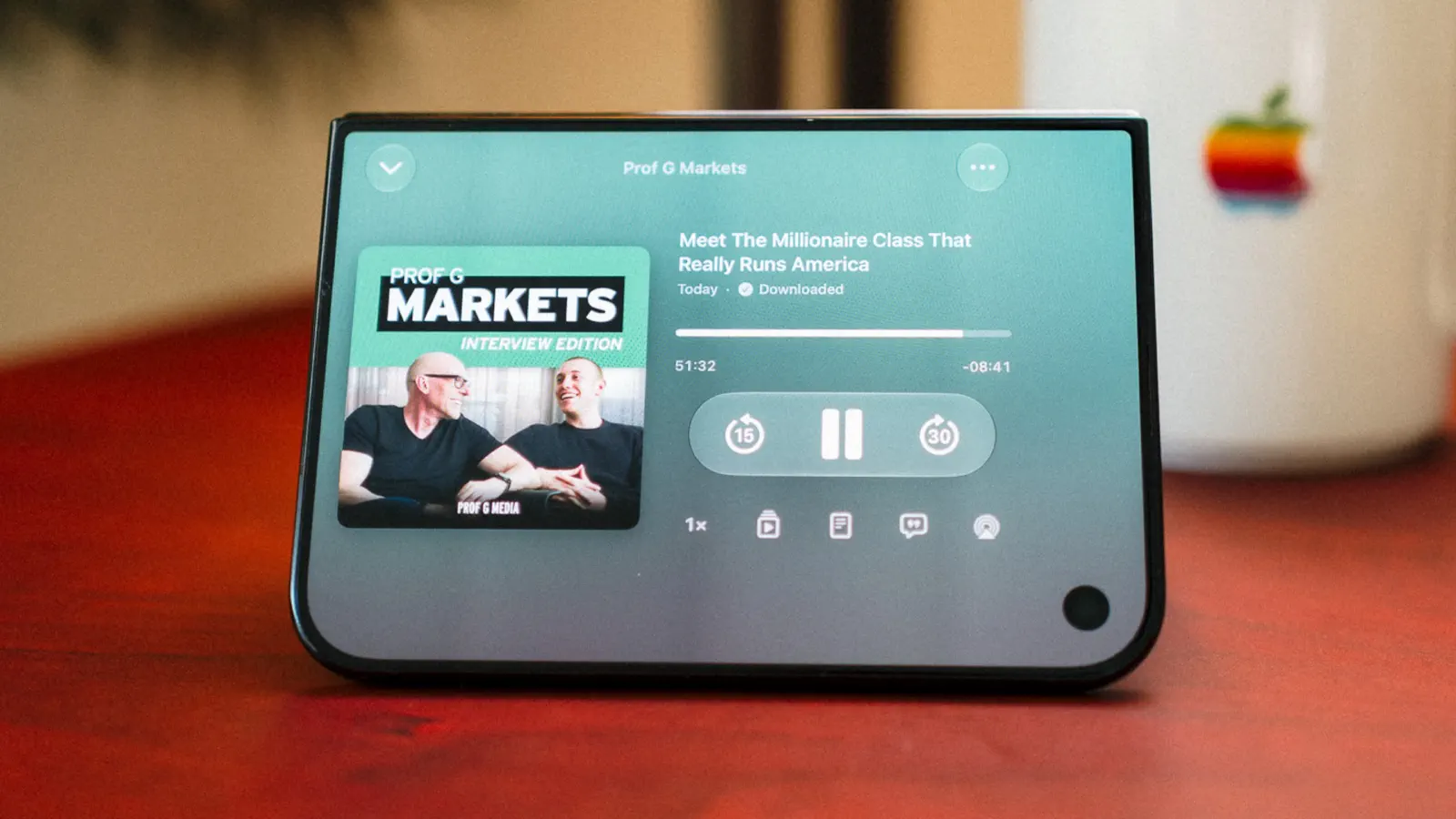
- There's now a speed button on the far left of the Now Playing screen. Each tap moves to the next speed: 1x, 1.2x, 1.5x, 1.8x, 2x, 2.5x, 3x. If you listen at a speed that isn't on that list, it's included too, so you can always get back to it. If a show has its own speed setting, the change goes to that show.
- The CarPlay toggle now updates a show's own Voice Boost setting instead of the global one, and the icon stays accurate when you change Voice Boost on your phone.
============================
BUG FIXES
============================
- Podcasts you don't follow could show up more than once in Unfollowed Podcasts. This happened if you opened a show from Search more than once and played, queued or logged its episodes. If you already have duplicates, long-press the extras and choose Delete Permanently.
- The podcast player's artwork briefly jumping in size when opening it on iPhone Duo's outer display.
- Fixed the Lock Screen and Control Center sometimes showing "Loading…" with no artwork while a podcast was playing.
- Fixed resuming a podcast after a long pause sometimes playing the first second or two of the episode before jumping back to your spot.
- Fixed TV episodes showing up out of order or missing after a show renumbers its episodes. Affected shows fix themselves the next time they refresh.
============================
NEW IN v5.4
============================
IPHONE DUO
Sofa is ready with full support for iPhone Duo.
PODCAST PLAYER REDESIGN
The podcast player has a fresh new look. It morphs open from the mini player, takes its colors from the episode's artwork, and keeps Up Next, Chapters and Notes right inside. Playback is smarter about what comes next, Voice Boost is improved, and feeds refresh and download overnight while charging.
PODCAST TRANSCRIPTS
Read along with your podcasts. If a show publishes a transcript, it's right there in the player. If it doesn't, Sofa can make one itself, entirely on your device: tap Generate, or let it quietly transcribe your downloaded episodes overnight while your phone charges. Either way, a live highlight follows along word by word as you listen, so you never lose your place.
SESSIONS
Ever wonder how long that book really took you, or how many hours you've sunk into a game? Now Sofa can tell you. Each time you log progress, add how long you spent and how far you got, in pages, chapters or whatever fits, and Sofa keeps a running total for every item. If you'd rather not estimate, start a timer when you sit down and stop it when you're done. It stays in view across the app, on your Lock Screen and in the Dynamic Island, so pausing for a snack is one tap.
STATS & LOGBOOK
Your sessions now show up in Stats and the Logbook. Books, Games, Music and Custom Category Stats get a Sessions section with time spent, totals for each unit and a weekly chart, and Logbook rows show session totals at a glance.
============================
As always, don't hesitate to reach out with any feedback. I'm always happy to hear from you: support@sofahq.com
– Shawn
5.4.327 Oct 2026
Hey gang, I hope you're ready for iPhone Duo!
============================
CHANGES & IMPROVEMENTS
============================
SEARCH
- Trending and Planner rows in Search now slide under the sidebar instead of stopping at its edge.
PODCAST PLAYER
- iPhone Duo, closed: the player's buttons (speed, panels and AirPlay) move out of the way so the artwork gets more room. In portrait they're a column along the side strip; in landscape and tent they're a row along the bottom, lined up with the front camera.
- Landscape on iPhone and closed iPhone Duo: Up Next, Chapters, Show Notes and Transcript now fill the screen. Episode info, play/pause and ⋯ stay up top; tap "x" to go back to the player.
- iPhone landscape: the cover art is now about as big as the controls instead of a thumbnail.
============================
BUG FIXES
============================
- Tapping "x" on the search bar used to clear what you typed but leave the old results on screen. Now both reset, and you're back to Trending.
- Tapping "x" while the keyboard was up could occasionally crash Sofa.
============================
NEW IN v5.4
============================
IPHONE DUO
Sofa is ready with full support for iPhone Duo.
PODCAST PLAYER REDESIGN
The podcast player has a fresh new look. It morphs open from the mini player, takes its colors from the episode's artwork, and keeps Up Next, Chapters and Notes right inside. Playback is smarter about what comes next, Voice Boost is improved, and feeds refresh and download overnight while charging.
PODCAST TRANSCRIPTS
Read along with your podcasts. If a show publishes a transcript, it's right there in the player. If it doesn't, Sofa can make one itself, entirely on your device: tap Generate, or let it quietly transcribe your downloaded episodes overnight while your phone charges. Either way, a live highlight follows along word by word as you listen, so you never lose your place.
SESSIONS
Ever wonder how long that book really took you, or how many hours you've sunk into a game? Now Sofa can tell you. Each time you log progress, add how long you spent and how far you got, in pages, chapters or whatever fits, and Sofa keeps a running total for every item. If you'd rather not estimate, start a timer when you sit down and stop it when you're done. It stays in view across the app, on your Lock Screen and in the Dynamic Island, so pausing for a snack is one tap.
STATS & LOGBOOK
Your sessions now show up in Stats and the Logbook. Books, Games, Music and Custom Category Stats get a Sessions section with time spent, totals for each unit and a weekly chart, and Logbook rows show session totals at a glance.
============================
As always, don't hesitate to reach out with any feedback. I'm always happy to hear from you: support@sofahq.com
– Shawn
5.4.224 Oct 2026
Hey gang, I hope you're ready for iPhone Duo!
============================
WHAT'S NEW
============================
- Search within lists, Logbook, Planner, Player, or Enjoying, or tap “Search everywhere” to search all of Sofa.
- Start tracking movies, shows, books, and games directly from Search, without adding them to a list first.
- Items you stop tracking or finish without logging move to the new “No Longer Tracking” section in Enjoying.
============================
CHANGES & IMPROVEMENTS
============================
PODCASTS
- Mark episodes as Played or Unplayed directly from the episode list, without opening the player.
- Select multiple episodes to mark as Played or Unplayed, add to Up Next, or Play Next.
LOGBOOK
- Top Categories now includes every category and counts only finished items.
- The “Checkpoints” filter is now called “Sessions.”
- Top lists now account for Sessions, finishes, and replays, with ties sorted by most recently finished.
- Sort Top lists by ratings or custom Ingredients, with preferences synced across devices.
- Items logged multiple times now appear as a single entry, and custom covers appear in all Top lists.
- Stats Recap now includes time spent in Sessions, even when you haven’t finished anything.
ENJOYING
- Log past sessions for finished Quick Log, Journal, and Counter items without changing their finished status.
- Finished items now show a checkmark in the progress ring, even if you didn’t reach your target.
SHORTCUTS
- Session actions have updated names for consistency, without breaking existing Shortcuts.
- Find Logbook Item now returns every logged entry, including dates and notes.
- Get Sessions now supports journal descriptions, photos, photo counts, Simple Counter items, and session time and progress.
- Create Session and Update Session let you set or edit titles, descriptions, and notes.
- Add Journal Entry now supports descriptions and photos.
- New Get Session Photos action collects photos from multiple sessions in chronological order.
- List items and TV shows now include Source and Source ID properties.
- Session deeplinks now open the item’s journal, and the Get Sessions picker only shows supported items.
============================
NEW IN v5.4
============================
IPHONE DUO
Sofa is ready with full support for iPhone Duo.
PODCAST PLAYER REDESIGN
The podcast player has a fresh new look. It morphs open from the mini player, takes its colors from the episode's artwork, and keeps Up Next, Chapters and Notes right inside. Playback is smarter about what comes next, Voice Boost is improved, and feeds refresh and download overnight while charging.
PODCAST TRANSCRIPTS
Read along with your podcasts. If a show publishes a transcript, it's right there in the player. If it doesn't, Sofa can make one itself, entirely on your device: tap Generate, or let it quietly transcribe your downloaded episodes overnight while your phone charges. Either way, a live highlight follows along word by word as you listen, so you never lose your place.
SESSIONS
Ever wonder how long that book really took you, or how many hours you've sunk into a game? Now Sofa can tell you. Each time you log progress, add how long you spent and how far you got, in pages, chapters or whatever fits, and Sofa keeps a running total for every item. If you'd rather not estimate, start a timer when you sit down and stop it when you're done. It stays in view across the app, on your Lock Screen and in the Dynamic Island, so pausing for a snack is one tap.
STATS & LOGBOOK
Your sessions now show up in Stats and the Logbook. Books, Games, Music and Custom Category Stats get a Sessions section with time spent, totals for each unit and a weekly chart, and Logbook rows show session totals at a glance.
============================
As always, don't hesitate to reach out with any feedback. I'm always happy to hear from you: support@sofahq.com
– Shawn
5.4.122 Oct 2026
Hey gang, I hope you're ready for some goodies!
============================
WHAT'S NEW
============================
- Search within lists, Logbook, Planner, Player, or Enjoying, or tap “Search everywhere” to search all of Sofa.
- Start tracking movies, shows, books, and games directly from Search, without adding them to a list first.
- Items you stop tracking or finish without logging move to the new “No Longer Tracking” section in Enjoying.
============================
CHANGES & IMPROVEMENTS
============================
PODCASTS
- Mark episodes as Played or Unplayed directly from the episode list, without opening the player.
- Select multiple episodes to mark as Played or Unplayed, add to Up Next, or Play Next.
LOGBOOK
- Top Categories now includes every category and counts only finished items.
- The “Checkpoints” filter is now called “Sessions.”
- Top lists now account for Sessions, finishes, and replays, with ties sorted by most recently finished.
- Sort Top lists by ratings or custom Ingredients, with preferences synced across devices.
- Items logged multiple times now appear as a single entry, and custom covers appear in all Top lists.
- Stats Recap now includes time spent in Sessions, even when you haven’t finished anything.
ENJOYING
- Log past sessions for finished Quick Log, Journal, and Counter items without changing their finished status.
- Finished items now show a checkmark in the progress ring, even if you didn’t reach your target.
SHORTCUTS
- Session actions have updated names for consistency, without breaking existing Shortcuts.
- Find Logbook Item now returns every logged entry, including dates and notes.
- Get Sessions now supports journal descriptions, photos, photo counts, Simple Counter items, and session time and progress.
- Create Session and Update Session let you set or edit titles, descriptions, and notes.
- Add Journal Entry now supports descriptions and photos.
- New Get Session Photos action collects photos from multiple sessions in chronological order.
- List items and TV shows now include Source and Source ID properties.
- Session deeplinks now open the item’s journal, and the Get Sessions picker only shows supported items.
============================
NEW IN v5.4
============================
IPHONE DUO
Sofa is ready with full support for iPhone Duo.
PODCAST PLAYER REDESIGN
The podcast player has a fresh new look. It morphs open from the mini player, takes its colors from the episode's artwork, and keeps Up Next, Chapters and Notes right inside. Playback is smarter about what comes next, Voice Boost is improved, and feeds refresh and download overnight while charging.
PODCAST TRANSCRIPTS
Read along with your podcasts. If a show publishes a transcript, it's right there in the player. If it doesn't, Sofa can make one itself, entirely on your device: tap Generate, or let it quietly transcribe your downloaded episodes overnight while your phone charges. Either way, a live highlight follows along word by word as you listen, so you never lose your place.
SESSIONS
Ever wonder how long that book really took you, or how many hours you've sunk into a game? Now Sofa can tell you. Each time you log progress, add how long you spent and how far you got, in pages, chapters or whatever fits, and Sofa keeps a running total for every item. If you'd rather not estimate, start a timer when you sit down and stop it when you're done. It stays in view across the app, on your Lock Screen and in the Dynamic Island, so pausing for a snack is one tap.
STATS & LOGBOOK
Your sessions now show up in Stats and the Logbook. Books, Games, Music and Custom Category Stats get a Sessions section with time spent, totals for each unit and a weekly chart, and Logbook rows show session totals at a glance.
============================
As always, don't hesitate to reach out with any feedback. I'm always happy to hear from you: support@sofahq.com
– Shawn
5.414 Oct 2026
Hey gang, I hope you're ready for some goodies!
============================
IPHONE DUO
============================
Sofa is ready with full support for iPhone Duo.
============================
PODCAST PLAYER
============================
PODCAST PLAYER REDESIGN
The podcast player has a fresh new look. It morphs open from the mini player, takes its colors from the episode's artwork, and keeps Up Next, Chapters and Notes right inside. Playback is smarter about what comes next, Voice Boost is improved, and feeds refresh and download overnight while charging.
PODCAST TRANSCRIPTS
Read along with your podcasts. If a show publishes a transcript, it's right there in the player. If it doesn't, Sofa can make one itself, entirely on your device: tap Generate, or let it quietly transcribe your downloaded episodes overnight while your phone charges. Either way, a live highlight follows along word by word as you listen, so you never lose your place.
============================
PROGRESS TRACKING
============================
SESSIONS
Ever wonder how long that book really took you, or how many hours you've sunk into a game? Now Sofa can tell you. Each time you log progress, add how long you spent and how far you got, in pages, chapters or whatever fits, and Sofa keeps a running total for every item. If you'd rather not estimate, start a timer when you sit down and stop it when you're done. It stays in view across the app, on your Lock Screen and in the Dynamic Island, so pausing for a snack is one tap.
STATS & LOGBOOK
Your sessions now show up in Stats and the Logbook. Books, Games, Music and Custom Category Stats get a Sessions section with time spent, totals for each unit and a weekly chart, and Logbook rows show session totals at a glance.
============================
SHORTCUTS
============================
- Get Items can now filter by Completed, and items include Completed and Date Completed for use in your own logic.
- New actions: Start Session, Stop Session, Pause Session, Resume Session, and Get Ingredient Value.
- Log Progress and Add Journal Entry take Duration and Amount.
- Items expose Properties, Current Value, Total, Checkpoint Type, Session Count and Total Session Time.
- Get Items no longer returns Quick Log entries, logbook stamps and episodes as duplicate items, and Category = Book now matches every book, not just manually added ones.
============================
IMPROVEMENTS
============================
- Caught-up shows no longer appear in the Dusty section of the Enjoying tab.
- Improved multiple window support. Each window keeps its own place in your Lists and is titled after what it shows. Open a new one with ⌃⌘N.
- Drag items from a list onto another list in the sidebar to move them, one at a time or a whole selection. And if you drop them in the wrong place, moves can now be undone.
- Long-press (or right-click on Mac) a link on an item's detail screen to copy it.
- Logbook: Date Only timestamps. A new Timestamps option in Settings → Logbook hides the time on Logbook entries and in the date pickers. Your times are still saved, so you can switch back whenever.
- Added a "To Watch" progress format for TV shows that counts only aired episodes, plus examples of every format in the TV Shows tracking settings.
- Video Game search improvements.
- Improved reliability when saving Ingredients from an item's detail screen.
============================
BUG FIXES
============================
Enjoy the many bug fixes that I can't fit into these release notes.
============================
As always, don't hesitate to reach out with feedback, issues, and suggestions. I'm always happy to hear from you: support@sofahq.com
– Shawn
5.3.121 Sept 2026
Hey gang, this update brings support many new features across Apple's new OS updates.
============================
CHANGES & IMPROVEMENTS
============================
- The Logbook's Recent view now adapts to how much you log. If you've logged fewer than 100 things in the last 30 days, Recent shows the last year instead. Light loggers no longer land on a nearly empty Logbook. If you log a lot, nothing changes and Recent stays at 30 days.
============================
BUG FIXES
============================
- Fixed an issue where Siri couldn't search Sofa. Say "Search Sofa for Severance" and Sofa opens to search with your query filled in.
- Fixed Stats showing "Unknown Artist" for every album (and missing authors for books), and fixed Music and Movies decades being based on the wrong date, so 70s albums no longer show up as "from the 2020s."
- When Recent had nothing to show, the Logbook said no items matched your filters, even though you hadn't picked any. It now says nothing's been logged in the last year and points you to All for older entries. A brand new, empty Logbook still says you haven't logged anything yet.
- A podcast episode could get stuck at the top of Up Next with the wrong date if the show's publisher briefly changed the episode's release date and then changed it back. Sofa now checks stored episode dates against the feed whenever you open a show and fixes any that drifted.
- Backups doubled in size starting with Beta 7 because every image and attachment was packaged twice. Backups are now roughly a third smaller.
- Backups created with this build can't be restored by older versions of Sofa.
============================
WHAT'S NEW in 5.3
============================
SPOTLIGHT SEARCH
Search from your Home Screen and you'll find your items, lists, and planner events, notes, and tasks — complete with cover art. Tap a result and Sofa opens straight to it.
VISUAL INTELLIGENCE
Point your camera at a book cover, movie poster, or game box and Sofa tells you whether it's already in your library. If it isn't, you get results you can add on the spot. Works from Apple's Visual Intelligence camera and from the new camera button in Sofa's search bar. If nothing matches, you can turn the photo into a custom item without losing the shot.
LOGBOOK RECAPS
Your month and year in the Logbook, written up as a card — what you finished, what you kept coming back to, when you were most active. Generated on your device, and shareable.
DESCRIBE A PLAN, GET AN EVENT
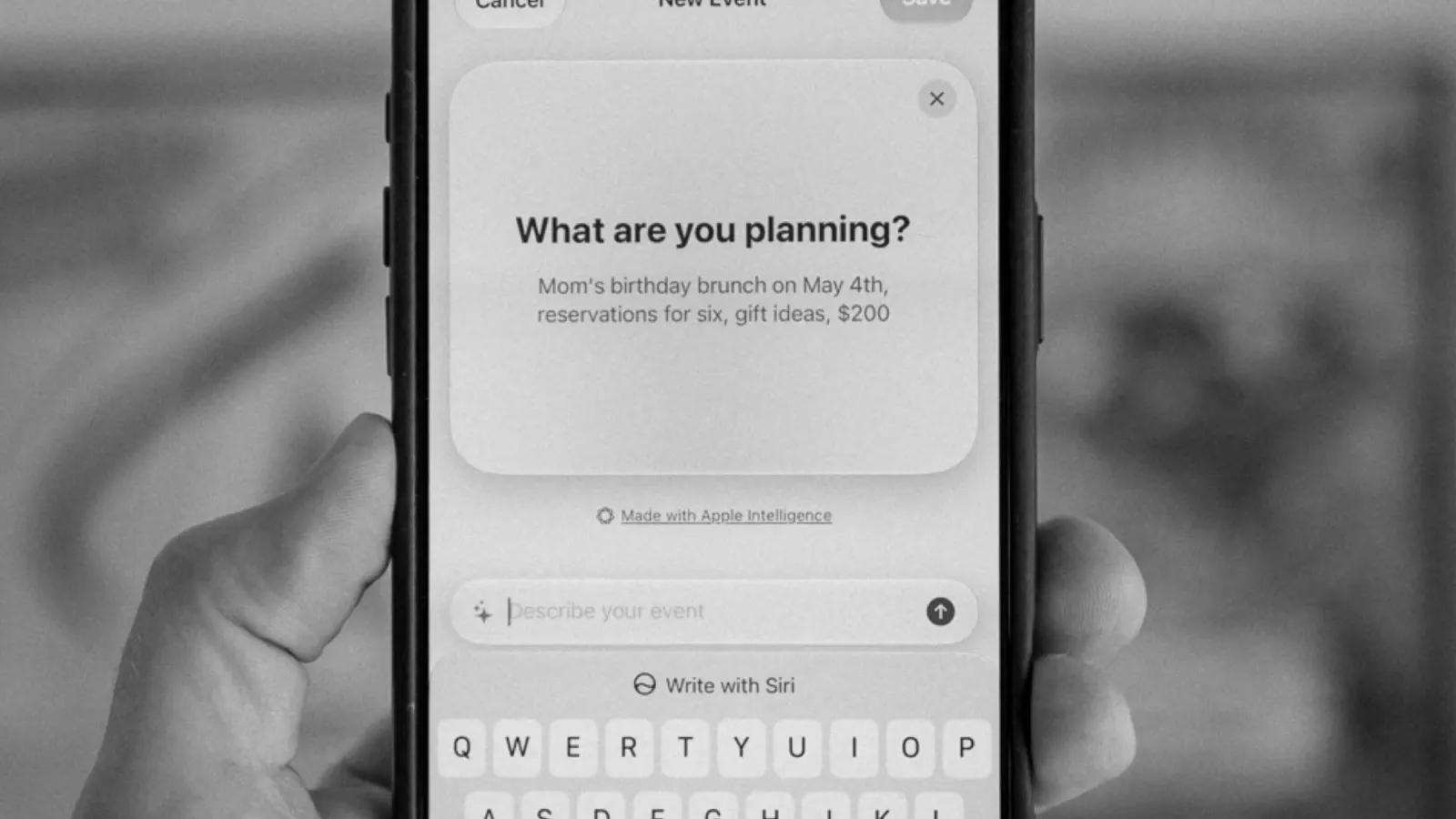
Type out a trip the way you'd say it — "Weekend in Portland with the kids, April 10–12, near the waterfront, bookstore day, budget around $600" — and Sofa fills in a draft event with dates, location, itinerary, and budgets. Nothing is saved until you review it.
GENERATED COVERS
Make custom artwork for lists, items, and events with Image Playground, right alongside the camera and photo options you already had.
NEW WIDGETS
All Sofa widgets now support the new full-page portrait extra-large size, plus the landscape XL size on iPad and Mac
SHARE EVENT PLANS
Share event plans as text, Markdown, a calendar file, or a printable PDF. The calendar export drops your whole trip into any calendar app as real timed events, timezones and all. This is a great way to quickly share a trip's itinerary with other people.
TV REWATCHING IMPROVEMENTS
TV rewatching is much better. “Watch Again” now preserves your previous watch in the Logbook before starting fresh, including watched episodes, dates, and notes. You can also log individual episodes multiple times without overwriting earlier views, see separate watch histories for shows and episodes, and track how many times you’ve watched each episode. Rewatches now count toward your stats and streaks, too, including a new Most Watched Episodes stat.
============================
As always, don't hesitate to reach out with feedback, issues, and suggestions. I'm always happy to hear from you: support@sofahq.com
– Shawn
5.314 Sept 2026
Hey gang, this update brings support many new features across Apple's new OS updates.
============================
WHAT'S NEW
============================
SPOTLIGHT SEARCH
Search from your Home Screen and you'll find your items, lists, and planner events, notes, and tasks — complete with cover art. Tap a result and Sofa opens straight to it.
VISUAL INTELLIGENCE
Point your camera at a book cover, movie poster, or game box and Sofa tells you whether it's already in your library. If it isn't, you get results you can add on the spot. Works from Apple's Visual Intelligence camera and from the new camera button in Sofa's search bar. If nothing matches, you can turn the photo into a custom item without losing the shot.
LOGBOOK RECAPS
Your month and year in the Logbook, written up as a card — what you finished, what you kept coming back to, when you were most active. Generated on your device, and shareable.
DESCRIBE A PLAN, GET AN EVENT
Type out a trip the way you'd say it — "Weekend in Portland with the kids, April 10–12, near the waterfront, bookstore day, budget around $600" — and Sofa fills in a draft event with dates, location, itinerary, and budgets. Nothing is saved until you review it.
GENERATED COVERS
Make custom artwork for lists, items, and events with Image Playground, right alongside the camera and photo options you already had.
NEW WIDGETS
All Sofa widgets now support the new full-page portrait extra-large size, plus the landscape XL size on iPad and Mac
SHARE EVENT PLANS
Share event plans as text, Markdown, a calendar file, or a printable PDF. The calendar export drops your whole trip into any calendar app as real timed events, timezones and all. This is a great way to quickly share a trip's itinerary with other people.
============================
TV REWATCHING IMPROVEMENTS
============================
TV rewatching is much better. “Watch Again” now preserves your previous watch in the Logbook before starting fresh, including watched episodes, dates, and notes. You can also log individual episodes multiple times without overwriting earlier views, see separate watch histories for shows and episodes, and track how many times you’ve watched each episode. Rewatches now count toward your stats and streaks, too, including a new Most Watched Episodes stat.
============================
BETTER BACKUPS
============================
Backups are now safer and more reliable. Sofa verifies backups before saving them and creates a safety copy before importing, so your library can be restored if something goes wrong. Corrupted data is also handled more gracefully, along with backup files renamed by iOS.
============================
BUG FIXES
============================
- Podcast playback position getting lost or rewound when syncing between devices.
- Book details being wiped by the daily refresh. A book whose refresh returned an empty response was having its title, description, and properties cleared. The refresh now correctly treats that as a failure and leaves your data alone.
- Board game details being wiped. Board games were being refreshed against an API that no longer exists, clearing properties and orphaning artwork on every pass. Board games are now local-only, as intended.
- A real Author or Genre could be overwritten with "Unknown" by a thin re-fetch.
- Smart Lists now handle completed items correctly. Phantom duplicates from Logbook history are gone, and Smart Lists set to “Todo List” now move logged items to the Completed section instead of hiding them.
- and more bug fixes that don't fit in these release notes.
============================
As always, don't hesitate to reach out with feedback, issues, and suggestions. I'm always happy to hear from you: support@sofahq.com
– Shawn
5.2.230 Jul 2026
Hey gang, I've got a ton of improvements and fixes in this release. Hope everyone is enjoying their summer!
IMPORTING IMPROVEMENTS
============================
- Sofa now remembers your last 10 imports in Settings → Data Management — undo any of them individually, with a heads-up if a newer import touched the same items.
- Trakt imports now respect dropped shows (→ Did Not Finish) and mark fully-caught-up shows as Watched instead of flooding Enjoying. New episodes that aired after you finished show up as new content.
- If an import matched the wrong movie, show, book, or game, tap it to search and pick the right one.
CHANGES & IMPROVEMENTS
============================
- Improvements to checking and updating tracked TV shows.
- Finishing a show you've bailed on (or the new "Stop Showing" option) now keeps it out of Enjoying, Returns Soon, and the Planner. Reversible anytime via Resume Watching.
- Custom items can now be added directly to your Logbook, with a date and time of your choosing.
- Event countdowns now show the true number of days for far-future events.
- Podcast chapters are now generated from more show-notes formats.
- Timestamps in podcast show notes are now tappable — tap one to jump the player to that spot.
SHORTCUTS
============================
- Start Tracking now takes a Total, a starting Current Value, and a Checkpoint Type.
- Update Counter has a new Set Total mode, so you can fix or change the goal on something you're already tracking and change the unit at the same time ("set total of Dune to 48 chapters").
BUG FIXES
============================
- Podcast playback position getting lost or rewound when syncing between devices.
- Manually sorted list items could jump to different positions.
- Completed show could show up in Enjoying if its episode data couldn't be fetched during import.
- Shows not reappearing in Enjoying when new episodes air.
- Finished shows no longer get stuck as "Caught Up" when a series ends after you added it — they now complete and land in your Logbook automatically, including when you mark the last episode via widgets, Shortcuts, or the Logbook.
- Tapping Sticky Note on an item you'd logged before could open and edit an older copy's note instead of creating one for the current item.
- Adding a podcast to the Logbook a second time moved the existing entry's date instead of adding a new one.
- A podcast followed and logged on the same day could be misread as "not new" and pull a full batch of episodes on its first refresh instead of one.
- Video game search returning odd results when the query had a trailing space.
- A bug that kept the Save button grayed out when adding a plan to an event, even after filling in the details.
- A mystery item could appear in the Pinned Items widget even though it was nowhere to be found in the app. The widget and the app now always agree on what's pinned.
- Issues where Planner items weren't properly being added to the Logbook.
- Podcasts followed by RSS link (like Patreon feeds) could disappear from Up Next when any show was set to Listen as a Series.
- Episode thumbnails briefly showing the wrong episode's artwork while scrolling quickly on slow networks.
- Grouping a list by an ingredient now reliably places tagged items in the right group.
- Shared links now save even when the page preview can't be loaded, instead of showing an error.
- Issue where the widget could get stuck showing sample content instead of your queue until you reconfigured it.
- The single-item Enjoying widget now updates as you track progress, instead of only refreshing after restarting your phone.
- Events could stop appearing in the widget entirely (while releases and episodes still showed).
- Background image for the Event countdown widget is now sharp instead of blurry when set to "Next Event."
As always, don't hesitate to reach out with feedback, issues, and suggestions. I'm always happy to hear from you: support@sofahq.com
– Shawn