
Large devices sit tightly below compact headings, alternating pale and dark panels to show both interface themes.


- Category
- Book
- Publisher
- Simone Montalto
- Version
- 4.7.3
- Approach
- Interface-led
Around the world
More localized listings →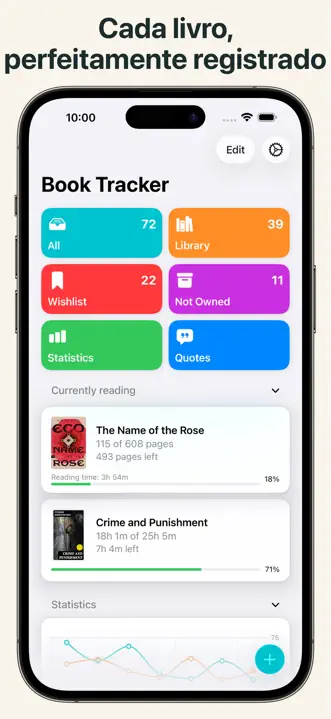


What’s New
4.7.3
Bug fixes
- Sorting by author. When sorting by author, some surnames landed in the wrong place: Johnson before Johns, Dawson before Daws. A surname now always comes before longer ones that start the same way, apostrophes are ignored (O'Brien after Obama), and a hyphen counts as a space. This also applies to translators, narrators, illustrators, categories, and publishers.
- Articles in the book's language. With "Ignore leading articles when sorting" on, articles from every language were ignored: an English book like "Die For Love" landed under F, because "Die" is a German article. Now only the articles of the book's language are ignored; for a book with no language set, those of every language.
- Titles with apostrophes and hyphens. When sorting by title, apostrophes are now ignored and a hyphen counts as a space: "Jo's Boys" comes after "Johann", "Hard-boiled" before "Hard Land".
- Series. When sorting by series, the name no longer loses its leading article: "The Wheel of Time" is under T.
The new order is applied automatically the first time you open the app after updating.
What's new in the latest update
- Reading year recap in Statistics, written with Apple Intelligence.
- Tag and category suggestions when you assign them to a book. They are never applied on their own: you decide.
- A switch in Settings to turn the Apple Intelligence features on or off.
- Many new actions for Siri and Shortcuts, which also understand the book, quote, note, or goal on screen. Get quotes, notes, ratings, milestones, and your yearly recap as an image, a PDF, or rich text.
- Your books in Spotlight search, in system suggestions, and in the widget Smart Stack.
- Reading session Live Activity refined: timer always readable, cover shown correctly, StandBy and landscape Dynamic Island, pause and resume right from the Live Activity.
- Export a book, your library, quotes, or notes as PDF.
- Importing rebuilt from the ground up: Book Tracker recognizes the file, shows you row by row what will happen, and can update the books you already have. Rows that could not be imported come back in a file that explains why.
- Library search ignores case, accents, and punctuation; title sorting is more consistent and can ignore leading articles. "Repair search and sorting" in Settings rebuilds that data if needed.
Some of these features require a device compatible with Apple Intelligence.
Book Tracker is crafted by an indie developer. Your feedback and suggestions help shape future updates. If you find the app useful, a review would mean a lot. For any support, contact me at support@booktrack.app.
Simone
4.7.2
Improvements
- Online cover search. Covers appear as each source answers, instead of waiting for the slowest one: if a source is slow or unavailable, you see right away the covers the others have found, and the indicator at the top stays visible while the search is still going. Closing the window stops the search.
Bug fixes
- List opened from Statistics. Tapping a month in a Statistics chart opened the list of books for that month, but the list would not scroll: it stayed on the first screen even when more books were below. It now scrolls all the way down.
- Cover found online. When editing a book, choosing a cover from "Edit image" and then "Search online" was ignored: the window closed and the old cover stayed. After you pick a cover, the crop screen now opens and the new cover is applied.
- Starting a reading. After tapping "Start reading" and saving the "Reading" status, the reading progress screen no longer opened on its own: the status was saved, but you had to look for it in the reading history. Once the status is saved, the progress screen now opens right away.
What's new in the latest update
- Reading year recap in Statistics, written with Apple Intelligence.
- Tag and category suggestions when you assign them to a book. They are never applied on their own: you decide.
- A switch in Settings to turn the Apple Intelligence features on or off.
- Many new actions for Siri and Shortcuts, which also understand the book, quote, note, or goal on screen. Get quotes, notes, ratings, milestones, and your yearly recap as an image, a PDF, or rich text.
- Your books in Spotlight search, in system suggestions, and in the widget Smart Stack.
- Reading session Live Activity refined: timer always readable, cover shown correctly, StandBy and landscape Dynamic Island, pause and resume right from the Live Activity.
- Export a book, your library, quotes, or notes as PDF.
- Importing rebuilt from the ground up: Book Tracker recognizes the file, shows you row by row what will happen, and can update the books you already have. Rows that could not be imported come back in a file that explains why.
- Library search ignores case, accents, and punctuation; title sorting is more consistent and can ignore leading articles. "Repair search and sorting" in Settings rebuilds that data if needed.
Some of these features require a device compatible with Apple Intelligence.
Book Tracker is crafted by an indie developer. Your feedback and suggestions help shape future updates. If you find the app useful, a review would mean a lot. For any support, contact me at support@booktrack.app.
Simone
4.7.1
Bug fixes
- Saving reading progress. On versions earlier than iOS 26 the Save button was missing from the reading progress screen: you could change pages or minutes, but the value was not recorded. The same happened to other top-right buttons, for example in editable lists and in the barcode scanner. Every button now shows.
- Reading streak. In the United Kingdom, Ireland, and Portugal the reading streak appeared broken at every change of the clocks, in October and in March, even if you had read every day. Your data was intact: the count was wrong. The streak is now counted by calendar days and is correct in every time zone.
- Importing a file exported by Book Tracker. If you exported your library, completed it in a spreadsheet, and imported it back choosing to update the books you already have, every book you had read received a second reading identical to the first, and your statistics doubled. A reading that begins on the same day as one you already have is now recognized as the same reading and is not added again.
- Importing and existing data. In some cases a note, a loan, a rating, or a reading in the file was not imported because the library kept a hidden duplicate, left behind by sync, with the same content. Only the data you actually see in the app counts now.
- Tags imported from another app. When a book in the file had several tags and one of them already existed in your library, the others were not created and the book ended up with only one or two. With Bookpedia exports, which put the same tag on every book, this affected almost the whole library. Every book now receives all the tags listed in the file.
What's new in the latest update
- Reading year recap in Statistics, written with Apple Intelligence.
- Tag and category suggestions when you assign them to a book. They are never applied on their own: you decide.
- A switch in Settings to turn the Apple Intelligence features on or off.
- Many new actions for Siri and Shortcuts, which also understand the book, quote, note, or goal on screen. Get quotes, notes, ratings, milestones, and your yearly recap as an image, a PDF, or rich text.
- Your books in Spotlight search, in system suggestions, and in the widget Smart Stack.
- Reading session Live Activity refined: timer always readable, cover shown correctly, StandBy and landscape Dynamic Island, pause and resume right from the Live Activity.
- Export a book, your library, quotes, or notes as PDF.
- Importing rebuilt from the ground up: Book Tracker recognizes the file, shows you row by row what will happen, and can update the books you already have. Rows that could not be imported come back in a file that explains why.
- Library search ignores case, accents, and punctuation; title sorting is more consistent and can ignore leading articles. "Repair search and sorting" in Settings rebuilds that data if needed.
Some of these features require a device compatible with Apple Intelligence.
Book Tracker is crafted by an indie developer. Your feedback and suggestions help shape future updates. If you find the app useful, a review would mean a lot. For any support, contact me at support@booktrack.app.
Simone
4.7.0
- Reading year recap. In Statistics you can generate a written summary of your reading year. It is created using Apple Intelligence, Apple's privacy-conscious technology.
- Tag and genre suggestions. When you assign tags or categories to a book, the app can suggest existing ones that fit the book, based on its title and description. Suggestions are never applied on their own: you decide.
- Apple Intelligence setting. Settings now includes a switch to turn the Apple Intelligence features on or off.
- Siri and Shortcuts integration. Book Tracker offers many actions for Siri and Shortcuts, with improved integrations. You can automate your reading tasks and get your content (quotes, notes, ratings, progress milestones, reading status, yearly recap) as an image, a PDF, or rich text straight from a shortcut or from Siri.
- Spotlight search. Your books appear in the system Spotlight search, so you can find and open them quickly from outside the app.
- Suggestions to keep reading. The book you are currently reading can appear in the widget Smart Stack and in system suggestions, so you can jump back in quickly.
- Siri and Shortcuts understand what is on screen. You can use Siri or a shortcut to act on the book, quote, note, or goal you are currently viewing.
- Reading session Live Activity. The timer now stays readable even for long sessions and is no longer clipped, the book cover is shown correctly, there is support for StandBy and for the Dynamic Island in landscape, and the expanded view has been refined. You can pause and resume right from the Live Activity.
- Export to PDF. You can export a book, your library, quotes, or notes as PDF.
- A new way to import from another app. Importing has been rebuilt from the ground up. Choose the file the other app gave you and Book Tracker works out which app wrote it and what is inside; if it does not recognize it, you say which column holds what, and the app fills in most of that for you. Before anything is written you see, row by row, what will happen: what is coming in, what looks like a book you already have, and what stays out. At the end you get a summary you can keep, and any rows that could not be imported come back as a file with your own columns plus one explaining why, so you can fix those rows and import just them.
- Update the books you already have. Importing is no longer only about adding. When a book in your file is already in your library, you choose whether to fill in only what is missing or let the file replace what you had written. You can decide for every row at once, or change your mind on a single row.
- More forgiving library search. When you search the books already in your library, the search now ignores case, accents, and punctuation, so you can find a book even when you type only part of the title or leave out accents.
- Improved title sorting. Alphabetical order is more consistent and ignores case and accents, and you can choose to ignore leading articles (The, A, …). If anything ever looks out of order, a new "Repair search and sorting" option in Settings rebuilds the data used to search and sort.
Some of these features require a device compatible with Apple Intelligence.
Book Tracker is crafted by an indie developer. Your feedback and suggestions help shape future updates. If you find the app useful, a review would mean a lot. For any support, contact me at support@booktrack.app.
Simone
4.6.0
* When searching for a book online, you can now choose whether to search by title or by author
* Fixed a problem with exporting the library to CSV or PDF format
* General app improvements
Book Tracker is crafted by an indie developer. Your feedback and suggestions help shape future updates. If you find the app useful, a review would mean a lot. For any support, contact me at support@booktrack.app.
Simone
4.5.12
* When searching online, the book format is now automatically displayed in search results. If this information is not available, the default format configured in Settings → Configurations will be used. Search results now also show the language and publication date, making it easier to identify the correct edition without opening the detail page
* Added the option to display the publication date in the book list. This can be configured in Settings → Configurations
* Added the ability to use Positions as a criterion in filters and Smart Lists
* Added the ability to export any book list as a PDF or CSV file directly from the book list screen, via the options menu (⋯) in the top right corner, by selecting Export
* Fixed an issue that could cause book ratings to display incorrectly on the reading sharing page
* Fixed an issue that could cause the app to crash unexpectedly when opening the barcode scanner
Book Tracker is crafted by an indie developer. Your feedback and suggestions help shape future updates. If you find the app useful, a review would mean a lot. For any support, contact me at support@booktrack.app.
Simone
4.5.11
* Fixed an issue that could cause the incorrect display of book ratings on the reading sharing page
* Fixed an issue that could cause the app to close unexpectedly when opening the barcode scanner
Book Tracker is crafted by an indie developer. Your feedback and suggestions help shape future updates. If you find the app useful, a review would mean a lot. For any support, contact me at support@booktrack.app.
Simone
4.5.10
* General fixes and improvements
Book Tracker is crafted by an indie developer. Your feedback and suggestions help shape future updates. If you find the app useful, a review would mean a lot. For any support, contact me at support@booktrack.app.
Simone
Listing history
Kit checks this listing every day, most recently on 17 Oct 2026. Changes to its screenshots, icon, subtitle, videos and events will show up here.
Compare with


Browse similar
Source: App Store listing by Simone Montalto, United States storefront. Captured 17 Oct 2026. The artwork belongs to its publisher and is shown here for reference.