4.12.224 Nov 2026
Know when to head to the airport, get traffic alerts before you go, and explore your friends’ Passports.
INTRODUCING WHEN TO LEAVE
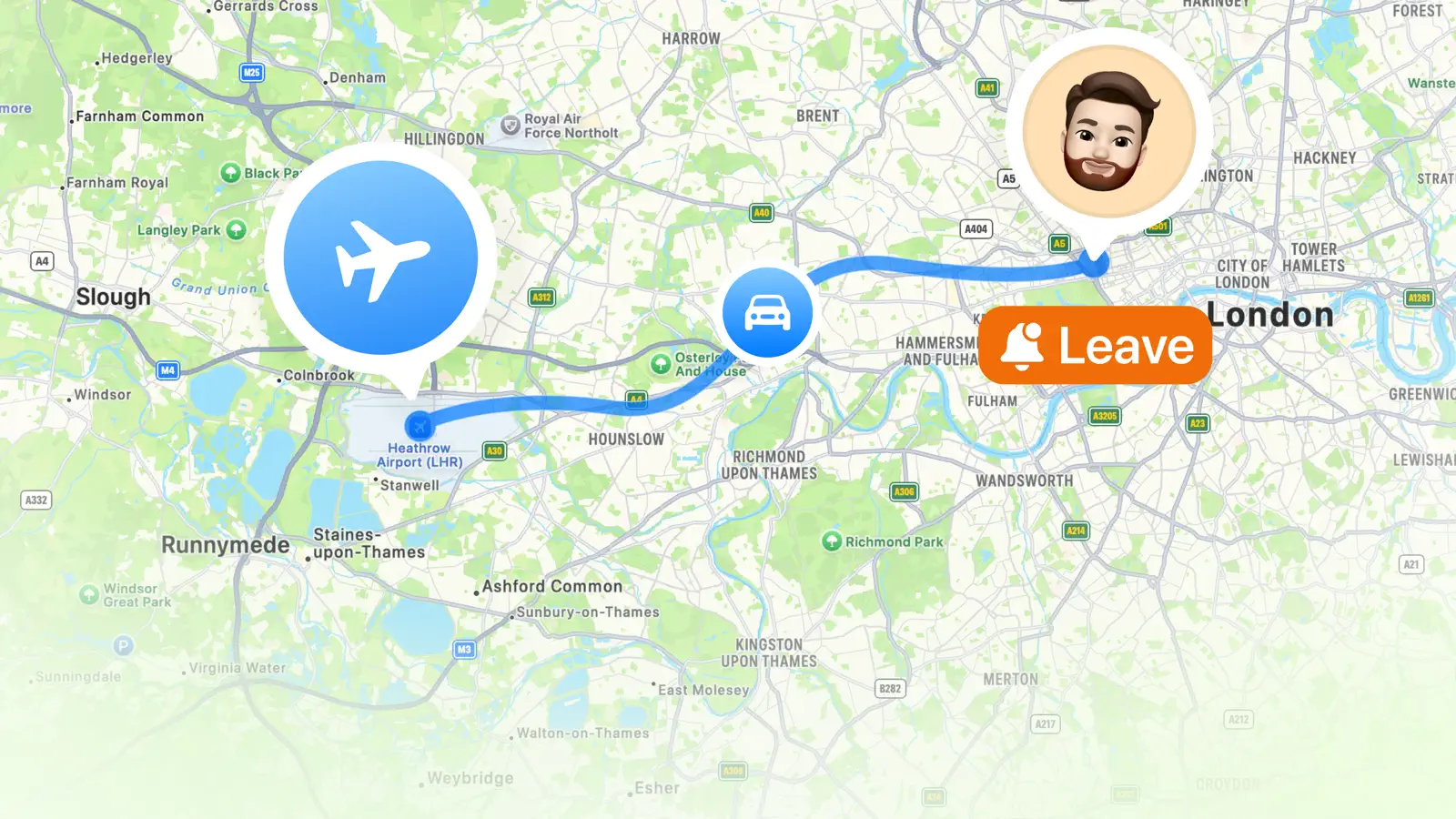
Know when to leave for the airport, with a personalized plan from door to departure. Flighty brings your travel time and airport routine together in one simple timeline.
# Travel Time Estimates
See how long your drive will take based on predicted traffic, or enter your own travel time. Add a buffer for extra breathing room.
# Traffic Alerts & Leave Reminders
Flighty keeps an eye on traffic along your route and warns you about delays before you set off. Get a reminder when it’s time to head to the airport, based on your plan.
# Local Public Holidays
See when your travel day falls on a public holiday at your departure airport, so you can allow extra time for travel and queues.
# Your Airport Routine
Make time for every step, from parking and check-in to security and the lounge. Set one total for your time at the airport, or build a plan activity by activity.
When to Leave is available to Flighty Pro users.
SEARCH YOUR PAST FLIGHTS
You can now search your past flights. No need to remember the exact details—just describe what you’re looking for. Try “longest flight this year,” “via OSL,” or “from EWR last year in business.”
SEE YOUR FRIENDS’ PASSPORTS
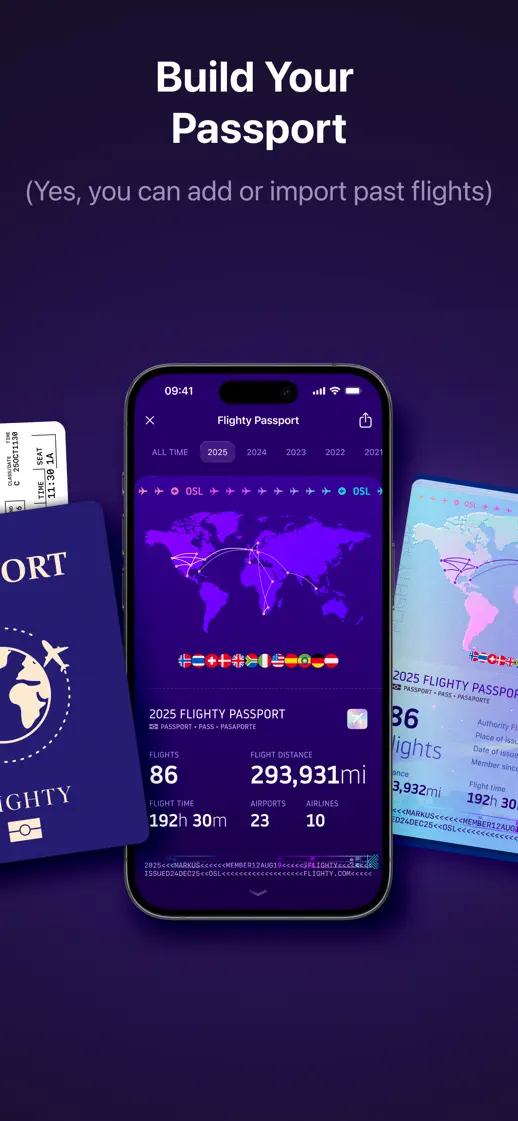
Explore your friends’ Passports. Compare countries visited, distance flown, and time in the sky to see how your travels stack up. Swipe through their Passports and discover everything from their longest flights to their most-visited airports—all from the Friends tab.
YOUR FAVORITE PEOPLE FIRST
Reorder friends to put family and travel buddies first. Have a long friends list? Long-press “Everyone” or “Today” to jump straight to a friend.
MORE FIXES AND IMPROVEMENTS
• Friends now opens to Today when someone is flying, so you can see who’s traveling at a glance.
• Tap the flight number at the top of Flight Details to copy it.
• You can now remove your profile photo and return to the default avatar.
• Your flights now show your avatar in All Flights, making them easier to spot alongside your friends’ flights.
• Reduced stuttering when panning and zooming around friends’ flights on the map.
• Tap a friend’s photo on the map to jump straight to their flights.
• Passport charts now switch to a monthly view when you select an individual year, fixing the graph that showed only a single dot.
• Fixed Passport’s home airport calculation and incorrect “Member Since” dates.
• Fixed cropped aircraft images and flight stats overlapping planes in Aircraft Report.
• Improved previews for social sharing stickers.
• Adding a past flight from Passport now keeps you in the Passport tab, so you can continue filling in your flight history.
• Improved sizing in the profile menu and fixed misaligned flight list headers on iPhone Duo.
• Fixed gate and baggage-claim details being cut off when using larger text or Display Zoom.
• Fixed current flights being treated as historical when using the Buddhist calendar.
• Fixed a crash that could stop Flighty from opening if a past flight was missing its arrival time.
• Fixed an error that prevented some users from deleting their account.
• Updated the holiday-themed mini planes that appear on the map.
4.12.112 Nov 2026
Know when to head to the airport, get traffic alerts before you go, and explore your friends’ Passports.
INTRODUCING WHEN TO LEAVE
Know when to leave for the airport, with a personalized plan from door to departure. Flighty brings your travel time and airport routine together in one simple timeline.
# Travel Time Estimates
See how long your drive will take based on predicted traffic, or enter your own travel time. Add a buffer for extra breathing room.
# Traffic Alerts & Leave Reminders
Flighty keeps an eye on traffic along your route and warns you about delays before you set off. Get a reminder when it’s time to head to the airport, based on your plan.
# Local Public Holidays
See when your travel day falls on a public holiday at your departure airport, so you can allow extra time for travel and queues.
# Your Airport Routine
Make time for every step, from parking and check-in to security and the lounge. Set one total for your time at the airport, or build a plan activity by activity.
When to Leave is available to Flighty Pro users.
SEARCH YOUR PAST FLIGHTS
You can now search your past flights. No need to remember the exact details—just describe what you’re looking for. Try “longest flight this year,” “via OSL,” or “from EWR last year in business.”
SEE YOUR FRIENDS’ PASSPORTS
Explore your friends’ Passports. Compare countries visited, distance flown, and time in the sky to see how your travels stack up. Swipe through their Passports and discover everything from their longest flights to their most-visited airports—all from the Friends tab.
YOUR FAVORITE PEOPLE FIRST
Reorder friends to put family and travel buddies first. Have a long friends list? Long-press “Everyone” or “Today” to jump straight to a friend.
MORE FIXES AND IMPROVEMENTS
• Friends now opens to Today when someone is flying, so you can see who’s traveling at a glance.
• Tap the flight number at the top of Flight Details to copy it.
• You can now remove your profile photo and return to the default avatar.
• Your flights now show your avatar in All Flights, making them easier to spot alongside your friends’ flights.
• Reduced stuttering when panning and zooming around friends’ flights on the map.
• Tap a friend’s photo on the map to jump straight to their flights.
• Passport charts now switch to a monthly view when you select an individual year, fixing the graph that showed only a single dot.
• Fixed Passport’s home airport calculation and incorrect “Member Since” dates.
• Fixed cropped aircraft images and flight stats overlapping planes in Aircraft Report.
• Improved previews for social sharing stickers.
• Adding a past flight from Passport now keeps you in the Passport tab, so you can continue filling in your flight history.
• Improved sizing in the profile menu and fixed misaligned flight list headers on iPhone Duo.
• Fixed gate and baggage-claim details being cut off when using larger text or Display Zoom.
• Fixed current flights being treated as historical when using the Buddhist calendar.
• Fixed a crash that could stop Flighty from opening if a past flight was missing its arrival time.
• Fixed an error that prevented some users from deleting their account.
• Updated the holiday-themed mini planes that appear on the map.
4.12.011 Nov 2026
Know when to head to the airport, get traffic alerts before you go, and explore your friends’ Passports.
INTRODUCING WHEN TO LEAVE
Know when to leave for the airport, with a personalized plan from door to departure. Flighty brings your travel time and airport routine together in one simple timeline.
# Travel Time Estimates
See how long your drive will take based on predicted traffic, or enter your own travel time. Add a buffer for extra breathing room.
# Traffic Alerts & Leave Reminders
Flighty keeps an eye on traffic along your route and warns you about delays before you set off. Get a reminder when it’s time to head to the airport, based on your plan.
# Local Public Holidays
See when your travel day falls on a public holiday at your departure airport, so you can allow extra time for travel and queues.
# Your Airport Routine
Make time for every step, from parking and check-in to security and the lounge. Set one total for your time at the airport, or build a plan activity by activity.
When to Leave is available to Flighty Pro users.
SEARCH YOUR PAST FLIGHTS
You can now search your past flights. No need to remember the exact details—just describe what you’re looking for. Try “longest flight this year,” “via OSL,” or “from EWR last year in business.”
SEE YOUR FRIENDS’ PASSPORTS
Explore your friends’ Passports. Compare countries visited, distance flown, and time in the sky to see how your travels stack up. Swipe through their Passports and discover everything from their longest flights to their most-visited airports—all from the Friends tab.
YOUR FAVORITE PEOPLE FIRST
Reorder friends to put family and travel buddies first. Have a long friends list? Long-press “Everyone” or “Today” to jump straight to a friend.
MORE FIXES AND IMPROVEMENTS
• Friends now opens to Today when someone is flying, so you can see who’s traveling at a glance.
• Tap the flight number at the top of Flight Details to copy it.
• You can now remove your profile photo and return to the default avatar.
• Your flights now show your avatar in All Flights, making them easier to spot alongside your friends’ flights.
• Reduced stuttering when panning and zooming around friends’ flights on the map.
• Tap a friend’s photo on the map to jump straight to their flights.
• Passport charts now switch to a monthly view when you select an individual year, fixing the graph that showed only a single dot.
• Fixed Passport’s home airport calculation and incorrect “Member Since” dates.
• Fixed cropped aircraft images and flight stats overlapping planes in Aircraft Report.
• Improved previews for social sharing stickers.
• Adding a past flight from Passport now keeps you in the Passport tab, so you can continue filling in your flight history.
• Improved sizing in the profile menu and fixed misaligned flight list headers on iPhone Duo.
• Fixed gate and baggage-claim details being cut off when using larger text or Display Zoom.
• Fixed current flights being treated as historical when using the Buddhist calendar.
• Fixed a crash that could stop Flighty from opening if a past flight was missing its arrival time.
• Fixed an error that prevented some users from deleting their account.
• Updated the holiday-themed mini planes that appear on the map.
4.11.326 Oct 2026
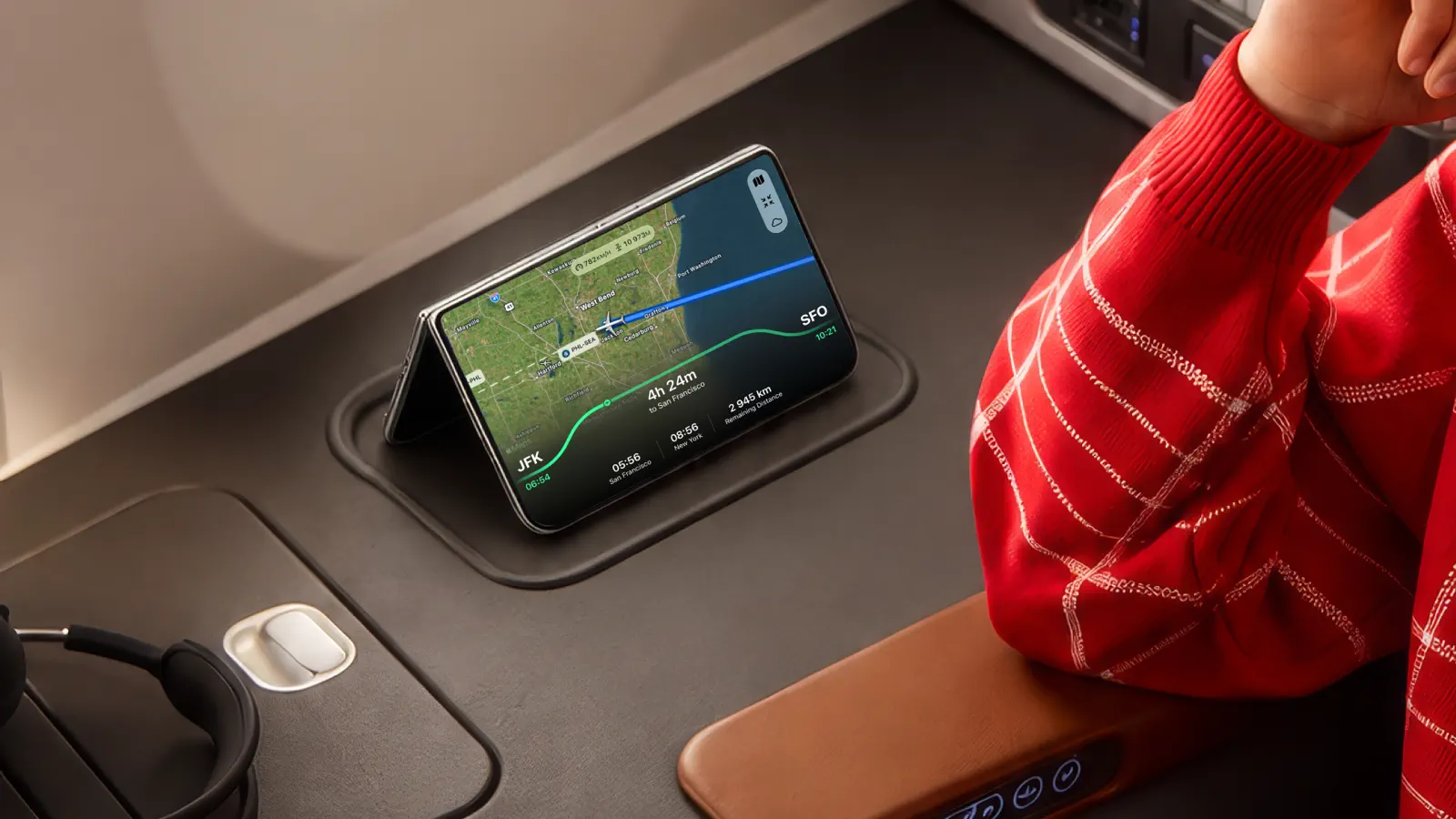
Flighty is ready for iPhone Duo.
During a flight, prop iPhone Duo up like a tent to follow your progress hands-free.
4.11.221 Oct 2026
Flighty is ready for iPhone Duo.
During a flight, prop iPhone Duo up like a tent to follow your progress hands-free.
4.11.117 Sept 2026
A refined Dynamic Island, flight answers from Siri, and two new looks for your Home Screen.
# DYNAMIC ISLAND REFINEMENTS
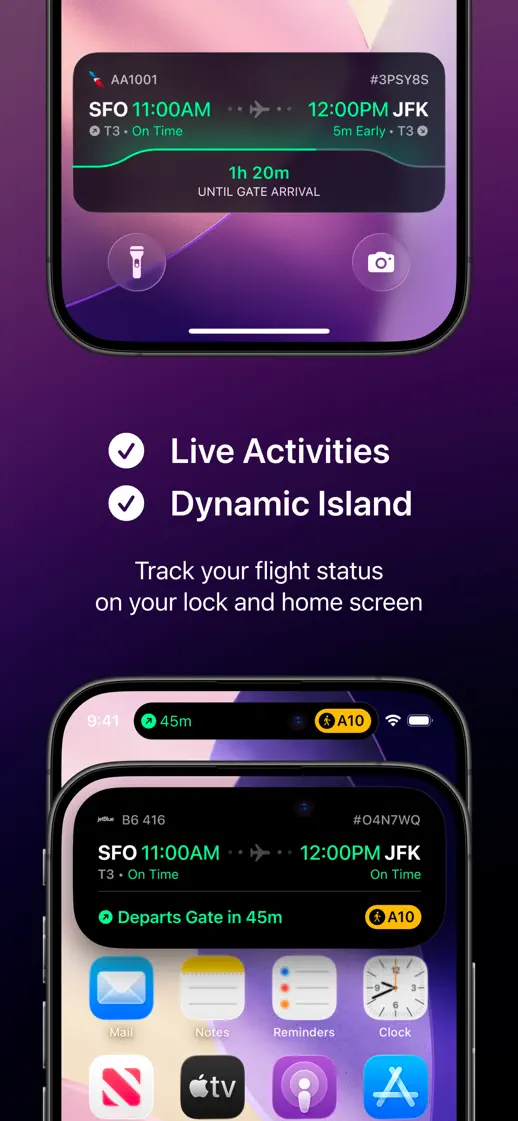
See how long until departure with a countdown that now appears even in the compact Dynamic Island. We’ve refined the gate badge, added a new arc showing your in-flight progress, and included support for smaller layouts on the newest devices.
# TWO NEW APP ICONS
Introducing Mappy and Speedy. Mappy brings a glassy map to your Home Screen, while Speedy celebrates the unmistakable Concorde. Try Speedy in dark mode to see the flames.
# ASK SIRI ABOUT YOUR FLIGHT
Check your flight status or find your next departure gate by asking Siri. Perfect when you’re juggling bags, coffee, and a boarding pass. Try:
“Hey Siri, ask Flighty, what's the status of my flight?”
“Hey Siri, ask Flighty, what's the gate for my next flight?”
4.11.014 Sept 2026
A refined Dynamic Island, flight answers from Siri, and two new looks for your Home Screen.
# DYNAMIC ISLAND REFINEMENTS
See how long until departure with a countdown that now appears even in the compact Dynamic Island. We’ve refined the gate badge, added a new arc showing your in-flight progress, and included support for smaller layouts on the newest devices.
# TWO NEW APP ICONS
Introducing Mappy and Speedy. Mappy brings a glassy map to your Home Screen, while Speedy celebrates the unmistakable Concorde. Try Speedy in dark mode to see the flames.
# ASK SIRI ABOUT YOUR FLIGHT
Check your flight status or find your next departure gate by asking Siri. Perfect when you’re juggling bags, coffee, and a boarding pass. Try:
“Hey Siri, ask Flighty, what's the status of my flight?”
“Hey Siri, ask Flighty, what's the gate for my next flight?”
4.10.114 Jul 2026
INTRODUCING CONNECTION ASSISTANT 2
Flighty now shows exactly what it takes to make your connection, with a personalized step-by-step guide for any airline, at airports worldwide.
# Required Checkpoints
See every checkpoint required for your exact connection, including passport control, customs, baggage re-check, security, air trains, terminal changes, and more. Flighty builds the guide based on your route, airport, nationality, and booking details.
# Typical Connection Time
See how long each step typically takes, so you know whether your connection is comfortable, close, or seriously tight. Times are based on historical patterns and normal conditions.
# Gate Predictions
Flighty can now predict arrival and departure gates before airlines assign them, based on prior flights and your inbound plane. Predictions may start as a concourse or gate range, then sharpen as departure gets closer.
# Personalized To You
Add your seat, class and passport to see even more tailored instructions, including e-gates, and citizenship-specific steps.
# Friends’ Connections
Connection Assistant also works with Flighty Friends, so you can see how tight a friend’s connection is, too.
Connection Assistant is available for Flighty Pro users.