
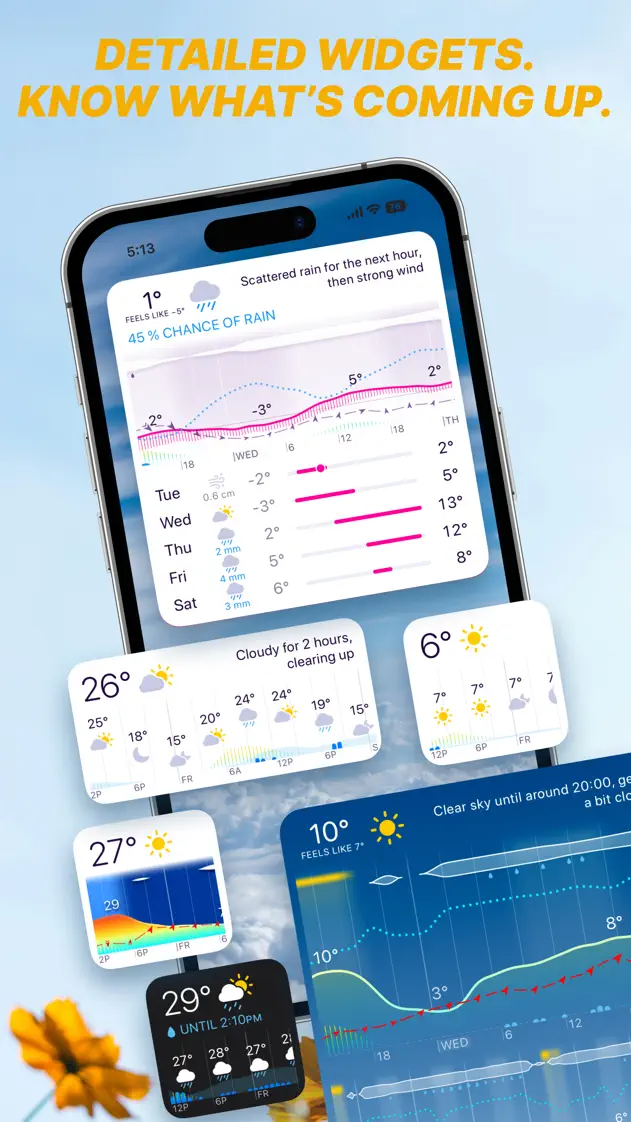
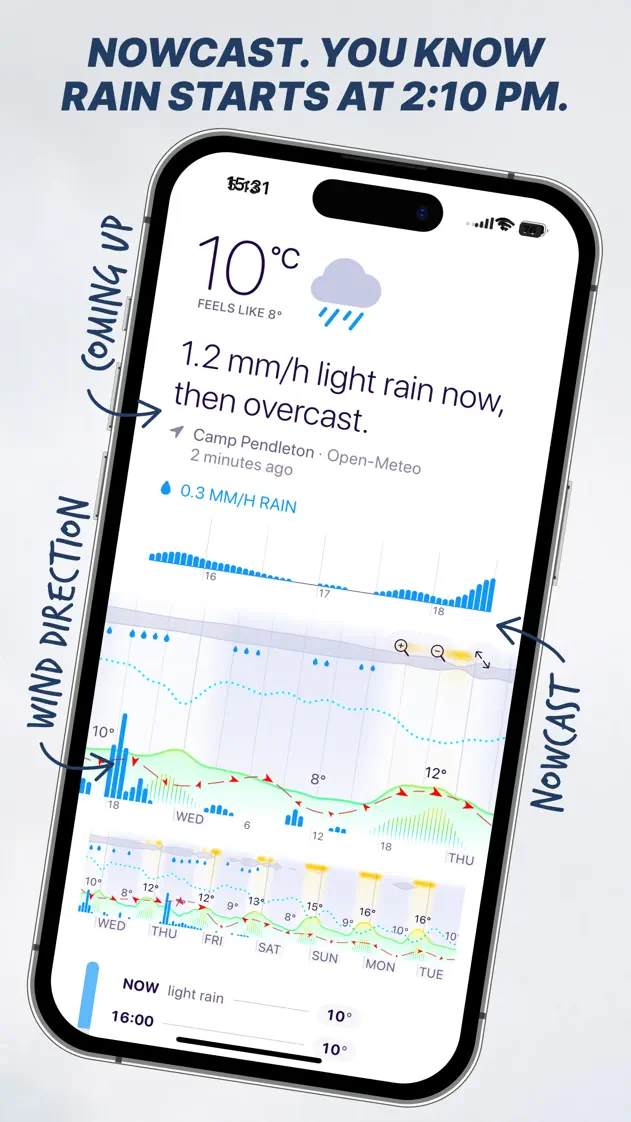
Italic uppercase headlines, handwritten annotations and tilted devices sit over photos, closing with review quotes and a developer portrait.





- Category
- Weather
- Publisher
- Tomas Kafka
- Version
- 1.0.377
- Approach
- Photography-led
App preview
What’s New
1.0.376
The Superupdate! Superforecast is here, along with rain and snow radar.
Compare up to seven world-class forecast models at once and see where rain and snow are heading.
Superforecast brings the world’s best weather models together on one graph. When they agree on a clear Saturday, you can plan that mountain hike with more confidence. When they disagree, keep your options open.
Check where rain and snow are falling and follow their predicted path up to two hours ahead with Foreca’s precipitation radar.
Both features are included with Pro and available during the trial.
Previously:
The previous update added wind widgets, an extra-large forecast widget, and Aviation and Arrows wind styles.
- Wind widgets for sailors, surfers and mountaineers show when the wind picks up or eases, with speed, direction and gusts from your chosen forecast source. Three new widgets cover the next few hours, the day ahead or the coming days. They’re also available on Apple Watch.
- The extra-large Forecast graph widget shows hourly and weekly charts plus up to seven daily forecasts. The widget comes in an extra-wide layout for iPad and a tall layout for iPhone on iOS 27 and later.
- Aviation and Arrows are new wind styles. Aviation brings the wind barbs used by pilots and meteorologists to your chart, with an in-app reading guide. Arrows grow as wind speed increases, and a second arrowhead shows gusts. Choose Wind style in Preferences. Aviation is included with Pro. Arrows is free.
- Hej, SMHI! Sweden’s national weather service joins the Pro forecast sources. Try its meteorologist-refined forecast for the Nordic and Baltic region, with wind gusts and the chance of rain or thunderstorms.
1.0.375
This update adds wind widgets, an extra-large forecast widget, and Aviation and Arrows wind styles.
- Wind widgets for sailors, surfers and mountaineers: see when the wind picks up or eases, with speed, direction and gusts from your chosen forecast source. Three new widgets cover the next few hours, the day ahead or the coming days. Also available on Apple Watch.
- Extra-large Forecast graph widget: hourly and weekly charts plus up to seven daily forecasts. An extra-wide layout for iPad, and a tall layout for iPhone on iOS 27 and later.
- Aviation and Arrows wind styles: Aviation brings the wind barbs used by pilots and meteorologists to your chart, with an in-app reading guide. Arrows grow with wind speed, with a second arrowhead for gusts. Choose Wind style in Preferences. Aviation is included with Pro; Arrows is free.
- Hej, SMHI! Sweden's national weather service joins the Pro forecast sources. Try its meteorologist-refined forecast for the Nordic and Baltic region, with wind gusts and rain and thunderstorm probability.
Previous update:
- New forecast widgets for your Home Screen, Lock Screen and Apple Watch, including a weekly view. ECMWF IFS and the Finnish Meteorological Institute joined the forecast sources.
- Weather-station layout for landscape view and the unfolded iPhone Duo
- More reliable forecast updates when the network falters.
Earlier highlights:
- Global minute-by-minute rain and snow forecasts from Rainbow.ai, with four hours of nowcast detail and rain alerts worldwide.
- Save multiple locations and switch between home, work, favourite trails and your next destination.
- Make the chart your own with the theme editor: mix palette, style, sky detail and accent colour, or start from a preset.
- Follow pressure changes with the pressure trend strip. Stronger marks highlight faster rises and falls.
- Hide place names on widgets for privacy
- Upgrade Pro Forever to cover your whole Family Sharing group
- Arabic language support, a simpler unit picker, and improvements to app speed and widget reliability.
- Tap the chart on Apple Watch to zoom in and out.
Thank you! Tomas.
1.0.374
This update adds wind widgets, an extra-large forecast widget, and Aviation and Arrows wind styles.
- Wind widgets for sailors, surfers and mountaineers: see when the wind picks up or eases, with speed, direction and gusts from your chosen forecast source. Three new widgets cover the next few hours, the day ahead or the coming days. Also available on Apple Watch.
- Extra-large Forecast graph widget: hourly and weekly charts plus up to seven daily forecasts. An extra-wide layout for iPad, and a tall layout for iPhone on iOS 27 and later.
- Aviation and Arrows wind styles: Aviation brings the wind barbs used by pilots and meteorologists to your chart, with an in-app reading guide. Arrows grow with wind speed, with a second arrowhead for gusts. Choose Wind style in Preferences. Aviation is included with Pro; Arrows is free.
- Hej, SMHI! Sweden's national weather service joins the Pro forecast sources. Try its meteorologist-refined forecast for the Nordic and Baltic region, with wind gusts and rain and thunderstorm probability.
Previous update:
- New forecast widgets for your Home Screen, Lock Screen and Apple Watch, including a weekly view. ECMWF IFS and the Finnish Meteorological Institute joined the forecast sources.
- Weather-station layout for landscape view and the unfolded iPhone Duo
- More reliable forecast updates when the network falters.
Earlier highlights:
- Global minute-by-minute rain and snow forecasts from Rainbow.ai, with four hours of nowcast detail and rain alerts worldwide.
- Save multiple locations and switch between home, work, favourite trails and your next destination.
- Make the chart your own with the theme editor: mix palette, style, sky detail and accent colour, or start from a preset.
- Follow pressure changes with the pressure trend strip. Stronger marks highlight faster rises and falls.
- Hide place names on widgets for privacy
- Upgrade Pro Forever to cover your whole Family Sharing group
- Arabic language support, a simpler unit picker, and improvements to app speed and widget reliability.
- Tap the chart on Apple Watch to zoom in and out.
Thank you! Tomas.
1.0.373
Read the wind like a pilot. The new Aviation wind style brings wind barbs to your forecast: the same symbols pilots use to read wind direction and speed. A short feather means 5 knots, a full feather 10, and a flag 50. The in-app guide shows you how to read them, including gusts. Choose Aviation under Wind style in Preferences, or try the new Aviation look. Available with Pro. Roger that.
Hej, SMHI! For our Scandinavian friends, Sweden's national weather service joins the Pro forecast sources. Try its meteorologist-refined forecast for the Nordic and Baltic region, with wind gusts and rain and thunderstorm probability.
The Looks gallery was updated to show off new capabilities. Try Aviation, or the new Ultralight & pressure look to see pressure rising and falling beneath your chart.
Previous update:
- New forecast widgets for your Home Screen, Lock Screen and Apple Watch, including a weekly view. ECMWF IFS and the Finnish Meteorological Institute joined the forecast sources.
- Weather-station layout for landscape view and the unfolded iPhone Duo
- More reliable forecast updates when the network falters.
Earlier highlights:
- Global minute-by-minute rain and snow forecasts from Rainbow.ai, with four hours of nowcast detail and rain alerts worldwide.
- Save multiple locations and switch between home, work, favourite trails and your next destination.
- Make the chart your own with the theme editor: mix palette, style, sky detail and accent colour, or start from a preset.
- Follow pressure changes with the pressure trend strip. Stronger marks highlight faster rises and falls.
- Hide place names on widgets for privacy
- Upgrade Pro Forever to cover your whole Family Sharing group
- Arabic language support, a simpler unit picker, and improvements to app speed and widget reliability.
- Tap the chart on Apple Watch to zoom in and out.
Thank you! Tomas.
1.0.372
Explosion of widgets. New forecast models. Hello Duo.
New Pro widgets join your collection with hour-by-hour, three-hourly and daily layouts. See weather icons, temperatures and precipitation amounts for each forecast period. Add them to your Home Screen, Lock Screen or Apple Watch. A new weekly view shows up to seven days with temperature-range bars.
More forecast choices with Pro: ECMWF IFS brings a European weather model with worldwide coverage. In the Nordic and Baltic region, choose the Finnish Meteorological Institute's meteorologist-refined forecast. Find both in Forecast sources.
Weathergraph is ready for your shiny new iPhone Duo. Unfold it… oooh! Or turn your iPhone or iPad sideways for a complete weather station.
Plus improved handling of forecast updates in case of network issues.
Previously:
Improved widget reliability and Arabic translation.
Before that:
Lot of improvements, including:
- Weathergraph is now much faster, and almost every screen got a polish.
- Arabic language support
- Simpler unit picker
- Private widgets: hide the place name on your widgets, and show off your screen without telling everyone where you live. Find it in Preferences, under Widgets.
- Pro Forever for the whole family: upgrade your Pro Forever purchase to cover everyone in your Family Sharing group. Tap the gear icon, then Pro.
P.S. And that's still not all: the next update will be… super!
And before that:
Never lose your place in the week: A frame on the weekly chart now shows exactly which slice of the forecast you’re exploring. Scroll the hourly chart and it follows along; tap a moment in the weekly chart to jump there, or press and drag to browse through the days.
Plus, chart zoom is now on your wrist: tap the chart on Apple Watch to zoom out for the week, zoom in for the afternoon, or return to the usual view.
Earlier:
Design the chart more freely with the new theme editor. Mix palette, style, sky detail, and accent colour, or start from a preset, to make Weathergraph fit your style.
Pressure is now much easier to read. A new Pro trend strip under the chart shows whether pressure is holding steady, rising, or falling. Fast changes stand out with stronger marks, so you can spot a front moving in sooner — useful for hiking, sailing, flying, fishing, or weather-sensitive heads and joints.
Even earlier:
Minute-by-minute rain, anywhere on Earth. Rainbow.ai's nowcast now covers the entire globe — including regions where radar was sparse or missing. Wherever you are, you get the same precise 4-hour forecast with minute-by-minute rain and snow detail.
- Truly global nowcast coverage, including Asia, Africa, South America, and the Arabian Peninsula
- Five geostationary satellites and hundreds of radars, 1 km² resolution
- Rain alerts now work everywhere in the world
New "Next few hours" bar sits right below the summary and keeps the upcoming hours visible at all times. One quick glance tells you if rain is coming, when clouds will clear, or when the sun goes down.
Multiple locations support. Save home, work, your favourite trails, or your next destination. Switch between them instantly with a single tap.
- Save multiple locations — home, work, mountains, your next destination
- Switch between them with one tap and get the full detailed forecast chart
- Performance and reliability improvements throughout
If you know friends or fellow outdoor lovers who would love Weathergraph's visual forecast, I'd be grateful if you could share or tweet a screenshot to let them know.
Thank you! Tomas.
1.0.371
Explosion of widgets. New forecast models. Hello Duo.
New Pro widgets join your collection with hour-by-hour, three-hourly and daily layouts. See weather icons, temperatures and precipitation amounts for each forecast period. Add them to your Home Screen, Lock Screen or Apple Watch. A new weekly view shows up to seven days with temperature-range bars.
More forecast choices with Pro: ECMWF IFS brings a European weather model with worldwide coverage. In the Nordic and Baltic region, choose the Finnish Meteorological Institute's meteorologist-refined forecast. Find both in Forecast sources.
Weathergraph is ready for your shiny new iPhone Duo. Unfold it… oooh! Or turn your iPhone or iPad sideways for a complete weather station.
Previously:
Improved widget reliability and Arabic translation.
Before that:
Lot of improvements, including:
- Weathergraph is now much faster, and almost every screen got a polish.
- Arabic language support
- Simpler unit picker
- Private widgets: hide the place name on your widgets, and show off your screen without telling everyone where you live. Find it in Preferences, under Widgets.
- Pro Forever for the whole family: upgrade your Pro Forever purchase to cover everyone in your Family Sharing group. Tap the gear icon, then Pro.
P.S. And that's still not all: the next update will be… super!
And before that:
Never lose your place in the week: A frame on the weekly chart now shows exactly which slice of the forecast you’re exploring. Scroll the hourly chart and it follows along; tap a moment in the weekly chart to jump there, or press and drag to browse through the days.
Plus, chart zoom is now on your wrist: tap the chart on Apple Watch to zoom out for the week, zoom in for the afternoon, or return to the usual view.
Earlier:
Design the chart more freely with the new theme editor. Mix palette, style, sky detail, and accent colour, or start from a preset, to make Weathergraph fit your style.
Pressure is now much easier to read. A new Pro trend strip under the chart shows whether pressure is holding steady, rising, or falling. Fast changes stand out with stronger marks, so you can spot a front moving in sooner — useful for hiking, sailing, flying, fishing, or weather-sensitive heads and joints.
Even earlier:
Minute-by-minute rain, anywhere on Earth. Rainbow.ai's nowcast now covers the entire globe — including regions where radar was sparse or missing. Wherever you are, you get the same precise 4-hour forecast with minute-by-minute rain and snow detail.
- Truly global nowcast coverage, including Asia, Africa, South America, and the Arabian Peninsula
- Five geostationary satellites and hundreds of radars, 1 km² resolution
- Rain alerts now work everywhere in the world
New "Next few hours" bar sits right below the summary and keeps the upcoming hours visible at all times. One quick glance tells you if rain is coming, when clouds will clear, or when the sun goes down.
Multiple locations support. Save home, work, your favourite trails, or your next destination. Switch between them instantly with a single tap.
- Save multiple locations — home, work, mountains, your next destination
- Switch between them with one tap and get the full detailed forecast chart
- Performance and reliability improvements throughout
If you know friends or fellow outdoor lovers who would love Weathergraph's visual forecast, I'd be grateful if you could share or tweet a screenshot to let them know.
Thank you! Tomas.
1.0.370
Explosion of widgets. New forecast models. Hello Duo.
New Pro widgets join your collection with hour-by-hour, three-hourly and daily layouts. See weather icons, temperatures and precipitation amounts for each forecast period. Add them to your Home Screen, Lock Screen or Apple Watch. A new weekly view shows up to seven days with temperature-range bars.
More forecast choices with Pro: ECMWF IFS brings a European weather model with worldwide coverage. In the Nordic and Baltic region, choose the Finnish Meteorological Institute's meteorologist-refined forecast. Find both in Forecast sources.
Weathergraph is ready for your shiny new iPhone Duo. Unfold it… oooh! Or turn your iPhone or iPad sideways for a complete weather station.
Previously:
Improved widget reliability and Arabic translation.
Before that:
Lot of improvements, including:
- Weathergraph is now much faster, and almost every screen got a polish.
- Arabic language support
- Simpler unit picker
- Private widgets: hide the place name on your widgets, and show off your screen without telling everyone where you live. Find it in Preferences, under Widgets.
- Pro Forever for the whole family: upgrade your Pro Forever purchase to cover everyone in your Family Sharing group. Tap the gear icon, then Pro.
P.S. And that's still not all: the next update will be… super!
And before that:
Never lose your place in the week: A frame on the weekly chart now shows exactly which slice of the forecast you’re exploring. Scroll the hourly chart and it follows along; tap a moment in the weekly chart to jump there, or press and drag to browse through the days.
Plus, chart zoom is now on your wrist: tap the chart on Apple Watch to zoom out for the week, zoom in for the afternoon, or return to the usual view.
Earlier:
Design the chart more freely with the new theme editor. Mix palette, style, sky detail, and accent colour, or start from a preset, to make Weathergraph fit your style.
Pressure is now much easier to read. A new Pro trend strip under the chart shows whether pressure is holding steady, rising, or falling. Fast changes stand out with stronger marks, so you can spot a front moving in sooner — useful for hiking, sailing, flying, fishing, or weather-sensitive heads and joints.
Even earlier:
Minute-by-minute rain, anywhere on Earth. Rainbow.ai's nowcast now covers the entire globe — including regions where radar was sparse or missing. Wherever you are, you get the same precise 4-hour forecast with minute-by-minute rain and snow detail.
- Truly global nowcast coverage, including Asia, Africa, South America, and the Arabian Peninsula
- Five geostationary satellites and hundreds of radars, 1 km² resolution
- Rain alerts now work everywhere in the world
New "Next few hours" bar sits right below the summary and keeps the upcoming hours visible at all times. One quick glance tells you if rain is coming, when clouds will clear, or when the sun goes down.
Multiple locations support. Save home, work, your favourite trails, or your next destination. Switch between them instantly with a single tap.
- Save multiple locations — home, work, mountains, your next destination
- Switch between them with one tap and get the full detailed forecast chart
- Performance and reliability improvements throughout
If you know friends or fellow outdoor lovers who would love Weathergraph's visual forecast, I'd be grateful if you could share or tweet a screenshot to let them know.
Thank you! Tomas.
1.0.369
Explosion of widgets. New forecast models. Hello Duo.
New Pro widgets join your collection with hour-by-hour, three-hourly and daily layouts. See weather icons, temperatures and precipitation amounts for each forecast period. Add them to your Home Screen, Lock Screen or Apple Watch. A new weekly view shows up to seven days with temperature-range bars.
More forecast choices with Pro: ECMWF IFS brings a European weather model with worldwide coverage. In the Nordic and Baltic region, choose the Finnish Meteorological Institute's meteorologist-refined forecast. Find both in Forecast sources.
Weathergraph is ready for your shiny new iPhone Duo. Unfold it… oooh! Or turn your iPhone or iPad sideways for a complete weather station.
Previously:
Improved widget reliability and Arabic translation.
Before that:
Lot of improvements, including:
- Weathergraph is now much faster, and almost every screen got a polish.
- Arabic language support
- Simpler unit picker
- Private widgets: hide the place name on your widgets, and show off your screen without telling everyone where you live. Find it in Preferences, under Widgets.
- Pro Forever for the whole family: upgrade your Pro Forever purchase to cover everyone in your Family Sharing group. Tap the gear icon, then Pro.
P.S. And that's still not all: the next update will be… super!
And before that:
Never lose your place in the week: A frame on the weekly chart now shows exactly which slice of the forecast you’re exploring. Scroll the hourly chart and it follows along; tap a moment in the weekly chart to jump there, or press and drag to browse through the days.
Plus, chart zoom is now on your wrist: tap the chart on Apple Watch to zoom out for the week, zoom in for the afternoon, or return to the usual view.
Earlier:
Design the chart more freely with the new theme editor. Mix palette, style, sky detail, and accent colour, or start from a preset, to make Weathergraph fit your style.
Pressure is now much easier to read. A new Pro trend strip under the chart shows whether pressure is holding steady, rising, or falling. Fast changes stand out with stronger marks, so you can spot a front moving in sooner — useful for hiking, sailing, flying, fishing, or weather-sensitive heads and joints.
Even earlier:
Minute-by-minute rain, anywhere on Earth. Rainbow.ai's nowcast now covers the entire globe — including regions where radar was sparse or missing. Wherever you are, you get the same precise 4-hour forecast with minute-by-minute rain and snow detail.
- Truly global nowcast coverage, including Asia, Africa, South America, and the Arabian Peninsula
- Five geostationary satellites and hundreds of radars, 1 km² resolution
- Rain alerts now work everywhere in the world
New "Next few hours" bar sits right below the summary and keeps the upcoming hours visible at all times. One quick glance tells you if rain is coming, when clouds will clear, or when the sun goes down.
Multiple locations support. Save home, work, your favourite trails, or your next destination. Switch between them instantly with a single tap.
- Save multiple locations — home, work, mountains, your next destination
- Switch between them with one tap and get the full detailed forecast chart
- Performance and reliability improvements throughout
If you know friends or fellow outdoor lovers who would love Weathergraph's visual forecast, I'd be grateful if you could share or tweet a screenshot to let them know.
Thank you! Tomas.
Listing history
New icon
New icon
New icon
New icon
New icon
New icon
New icon
New icon
New icon
New preview video
New icon
New preview video
New icon
Compare with


Browse similar
Source: App Store listing by Tomas Kafka, United States storefront. Captured 27 Nov 2026. The artwork belongs to its publisher and is shown here for reference.